|
171. Cannot use vpn The server certificate has expired Contact your network admin
2018-12-11
Show/Hide
|
Try to remove your VPN setting and setup a new one. Refer https://linc.xmu.edu.my/vpn Login using the new setup VPN connection, using your campus ID and password (same password as your Moodle and AC password).
If problem persisted, visit IT office in B1-102 or A5-116
|
|
172. I couldn't activate my Microsoft with KMS activation script
2018-12-04
Show/Hide
|
Make sure you are fully uninstall your previous microsoft office, kindly refer to https://support.office.com/en-us/article/uninstall-office-from-a-pc-9dd49b83-264a-477a-8fcc-2fdf5dbf61d8
After uninstalling Microsoft Office, restart your PC/Laptop then install the XMUM Microsoft Office. Now, run KMS script as administator to activate your Microsoft Office.
***Please note that KMS activation script only work with Microsoft Office Installer that provided from XMUM.
To check whether the activation is successful or not, you may open any microsoft office software in the package and click on "File" on the top left then click on "Account". Check under Product information stated "Product Activated" same as the screenshot provided as below : 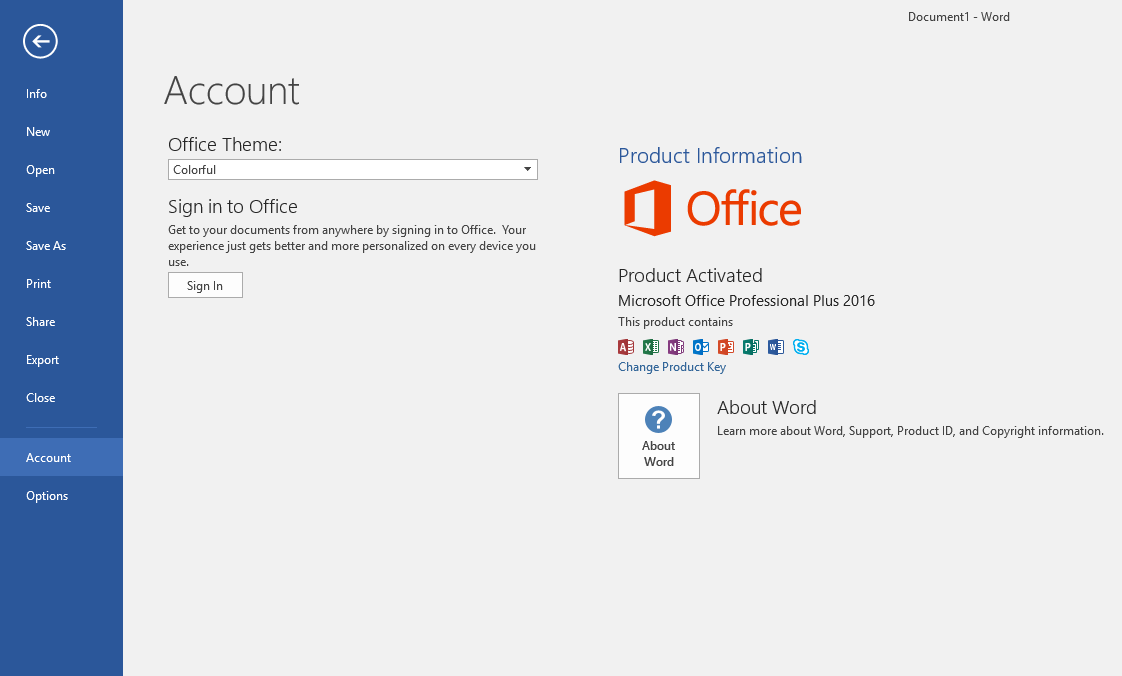
|
|
173. MY Subject (Research Methodology) missing from my course list in Moodle.
2018-11-28
Show/Hide
|
Research Methodology course under 'Past' category because the course was inactive. Edit course start date and it will become visible 'In progress' category. Lecturer need to update the course category in Edit Course Setting and also update enrolment key with the new course semester start and end dates.
Refer to the Moodle Quick Guide (For Lecturer) in below URL https://l.xmu.edu.my/course/view.php?id=240
|
|
174. Unable to login to Moodle using my student id, more than 6 failure attempts. Pls help
2018-11-26
Show/Hide
|
Student entered incorrect campus id's password continously for more than 6 times, thus Moodle has locked user account. IT has unlocked user account in Moodle, student then able to proceed with Moodle login and access.
|
|
175. How do I create a turnitin account?
2018-11-14
Show/Hide
|
Kindly please contact the respective Office of Academic Affairs for Turnitin’s login access request.
|
|
176. I want to view both xmu and group email in outlook
2018-11-02
Show/Hide
|
For adding additional email account, User must use the outlook desktop software in order to perform this task. First, go to files tab 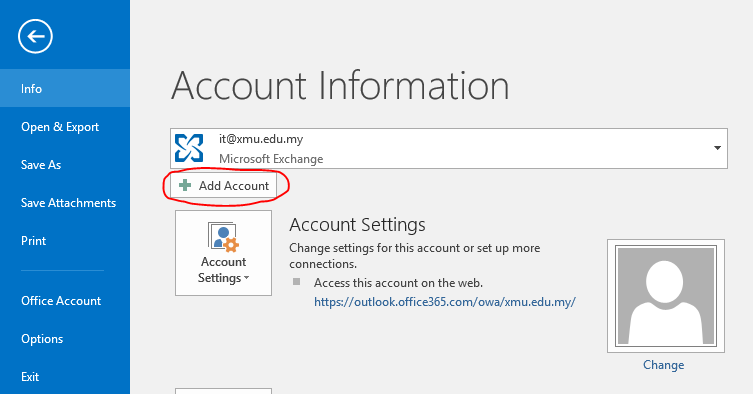
click on add account 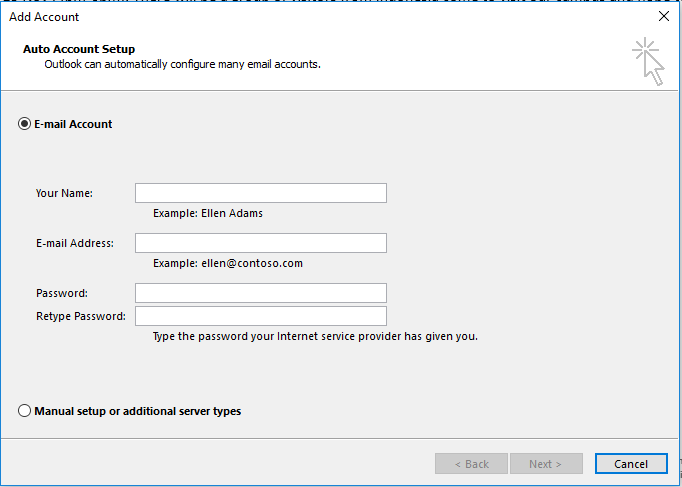
then key in the email adress and password correctly then restart the outlook.
|
|
177. I am unable to access Barracuda website for 4 days. (refer pic)
2018-10-25
Show/Hide
|
|
|
|
178. How do I get Outlook back online?
2018-10-24
Show/Hide
|
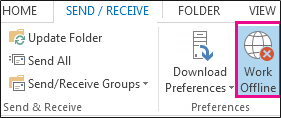
In Outlook, on the Send/Receive tab, choose Work Offline to reconnect.
|
|
179. How can I get school bus schedule online?
2018-10-22
Show/Hide
|
|
|
|
180. I was wondering whether the students are allowed to submit their assignment directly through Moodle
2018-10-17
Show/Hide
|
Student can submit assignment through Moodle and lecturers can grade the assignment. Below are steps how to add assignment in Moodle. 1. Go to the course where you want the assignment; In the setting menu  2. Click Turn editing on. 3. Click 'Add an activity or resource'. 4. Click the Assignment button and click 'Add' 5. For further info, click here for Moodle Quick Start guide.
|